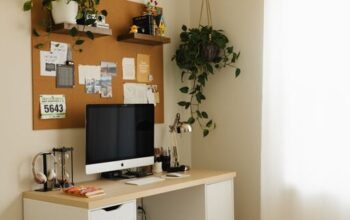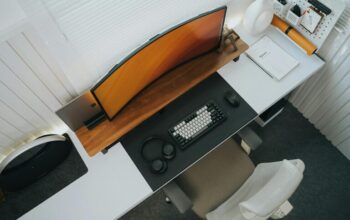

Creating a cozy and functional home workspace is essential for anyone who spends a significant amount of time working from home. Whether you’re a remote employee, freelancer, or simply need a dedicated spot for managing household tasks, a thoughtfully designed workspace can boost your productivity and overall well-being. In this post, we’ll explore practical tips to help you set up a workspace that feels comfortable and works efficiently.
Why a Cozy and Functional Workspace Matters
A well-designed workspace is more than just a desk and a chair. It supports focus, reduces distractions, and encourages good posture. When your workspace is inviting and tailored to your needs, you’re more likely to enjoy your work and maintain a healthy balance between comfort and efficiency.
Choosing the Right Location
Find a Quiet Spot
Select a place in your home with minimal noise and few distractions. This could be a spare room, a section of your living room, or even a nook by a window.
Consider Natural Light
Natural light can improve mood and reduce eye strain. Try positioning your desk near a window, but avoid direct glare on your computer screen.
Selecting Furniture That Balances Comfort and Style
Invest in an Ergonomic Chair
A comfortable chair with adjustable height and good back support is key to preventing discomfort during long work sessions.
Opt for a Spacious Desk
Make sure your desk is large enough to fit your computer, necessary supplies, and some personal touches without clutter.
Consider Standing Desks or Adjustable Solutions
Standing desks or sit-to-stand converters promote better circulation and reduce the risks associated with sitting too long.
Organizing Your Workspace for Efficiency
Keep Essential Items Within Reach
Arrange your most-used tools—like pens, notebooks, or chargers—where you can easily access them.
Use Storage Solutions
Shelves, drawers, and organizers keep clutter at bay. Label containers to simplify locating supplies.
Manage Cable Clutter
Cable ties, clips, or under-desk trays help keep cords organized and safely out of the way.
Personalizing Your Space to Make It Cozy
Add Soft Textiles
A cushioned chair pad, a small area rug, or a cozy throw blanket can add warmth and comfort.
Bring in Greenery
Houseplants improve air quality and create a calming environment.
Use Soothing Colors
Choose colors for your walls or decor that promote concentration and calmness, such as soft blues, greens, or neutrals.
Incorporate Personal Touches
Photos, artwork, or favorite books make your workspace uniquely yours.
Lighting Strategies for Comfort and Clarity
Combine Ambient and Task Lighting
Layer soft overhead lights with task lamps to reduce eye strain and create a balanced illumination.
Choose Adjustable Lamps
Switchable brightness and flexible necks allow you to direct light where you need it most.
Maintaining Your Workspace Daily
Develop a Quick Clean-Up Routine
Spend a few minutes at the end of each day tidying your desk. A clean space supports a clear mind.
Reassess Your Setup Regularly
Evaluate what’s working and make small changes to improve comfort and organization.
Technology Tips for a Functional Workspace
Use a Quality Monitor and Keyboard
Large monitors reduce eye strain, and ergonomic keyboards help with wrist comfort.
Keep Your Devices Updated and Charged
Regular updates keep software running smoothly, and a charging station keeps devices ready for use.
Use Headphones or Noise-Canceling Options
If your home is noisy, headphones can help maintain focus.
Balancing Work and Breaks in Your Home Workspace
Schedule Regular Breaks
Step away from your desk to stretch or walk, helping to refresh your mind and body.
Create a Separate Zone for Relaxation
If possible, designate another area for breaks to physically and mentally separate work from rest.
Final Thoughts
Designing a cozy and functional home workspace doesn’t have to be overwhelming. By focusing on comfort, organization, and personalization, you can create an environment that encourages productivity and well-being. Remember, your workspace should reflect your unique needs and preferences—don’t be afraid to experiment and adjust until you find what works best for you.
With these tips, you’re well on your way to enjoying a productive and comfortable work-from-home experience!